Hi, I'm Ray 👋 and this is where I write posts, collect links, and jot notes.

Check out my stories and photography or posts on software engineering, product development, leadership, or any other topics you might like.

See what I use or what else I'm up to now.

Otherwise, check out my latest posts, links, and notes below or subscribe to a feed.

An LLM-Augmented Work Wiki

I like to maintain my own personal set of Markdown notes for work. The act of typing ideas and information helps me process them mentally. I tend to organise my notes as a series of daily notes with links to longer-lived reference notes for concepts or projects.

I switched from NotePlan to Obsidian as a veneer over the Markdown files a while back. I didn’t have a need for NotePlan’s task management infrastructure. Obsidian is free and has loads of plugins if you want to cut loose on extending it.

I recently started a new job, which meant creating a brand-new vault, and I felt like giving the LLM Wiki approach a crack. Ultimately, having a robot do all the wiki bookkeeping for me feels like a worthwhile experiment.

The overall workflow is simple: I write in my daily note throughout the day, and I ask an LLM to process it at the end of the day. The LLM fetches relevant meeting transcripts and whatever else it can find by following links in my daily note. It then links everything together in long-lived notes covering projects, domain concepts, people I work with, and anything else it decides to maintain.

I also maintain a file called big-picture.md, which outlines the main open loops on my mind from week to week. The LLM doesn’t edit the main part of this file, though it can add reference information to a dedicated section at the bottom.

The vault is a Git repository, so both the LLM and I can use its version history to see how things have evolved over time.

I can search the long-lived notes in Obsidian to get an up-to-date view of each project, person, or concept, along with related information from linked notes.

As a bonus, during my end-of-week review, I ask the LLM to summarise my week, including which tasks or open loops I’ve moved forward or closed, and which new ones I’ve created. This helps me set my goals for the following week. I put these reflections and goals in a weekly note.

That’s pretty much it. I’ve found the reduction in bookkeeping valuable so far. I’ll see how well it scales over time.

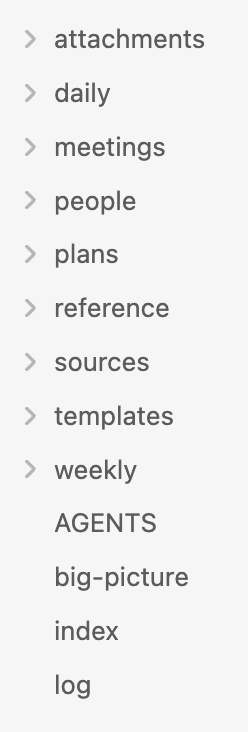
Folder and file structure of my Obsidian work vault

The layout of my work wiki

As for plugins, I try to use as few as possible. These are the ones I use in this vault.

  • At People for easily creating references to people notes.
  • Seek for better vault search than Obsidian provides out of the box.
  • Calendar for visually navigating daily and weekly notes.
  • Dataview for rolling up indexes of notes. The LLM added this and uses it; I only consume the results.
  • Mister Sheen for sanitising text pasted in from Slack and Google Docs. I got the LLM to write this private plugin to apply my preferred formatting.

I’m in the new job SaaS onboarding washing machine.

These apps are falling over themselves to pop up callouts over every button they have available to get me to click them.

I’m like Indy with a machete hacking past them to get to the humble dashboard button or whatever.

Should You Use AI for a Task?

Bruce Schneier:

At work, if your job is to move a bunch of heavy things from one side of the room to another, you should use whatever assistive tech you have on hand: a wagon, a forklift … even an AI-powered robot. But at the gym, it makes no sense for that robot to lift weights for you. The point of weightlifting isn’t to move heavy things across the room; it’s to actually lift those heavy things. The same analysis holds for any task an AI can do for you. If it’s work – if the task has to be done and no one cares how – then it’s fine to use AI assistance. But if the task is more like the gym, and how the task is done is at least as important, then it probably doesn’t make sense to use AI.

In Defense of Mandates

Charity Majors:

The mandate is one way of putting organizational muscle behind a decision. It’s a funding mechanism. It works by acknowledging that “hey, we are all going to be a little slower for a bit while we figure this out, and it will be annoying and expensive and we accept that.”

Without funding and a mandate, you’re effectively telling your employees to build these skills in their spare time, if they can and if they feel like it. Which is the same as telling them “this is NOT a priority, we are NOT willing to fund it.”

Sending Your IP to Frontier Labs

Ben Thompson:

What Karp is driving at is the flip-side of the points I am making above: the challenge for enterprises when it comes to using the frontier models is not simply that tokens are expensive, but that they are potentially giving valuable data to the labs who, in the long run, have an economic imperative to move up the stack and own the customer directly.

The Conversation Is the Commit

Chad Fowler:

Why are humans allowed to edit the output at all? If you care about provenance—about being able to trace every line of code back to a decision—then manual edits are a problem. They break the chain. They introduce code that has no record, no explanation, no origin you can inspect. So you end up in an uncomfortable place: You don’t just prefer that agents write the code. You require it. Not because agents are better programmers. But because they are the only way to guarantee that every change passes through a process that can be captured, inspected, and replayed. Humans don’t stop participating. They just move up a level. They define intent. They shape constraints. They review outcomes. But they don’t write the code directly anymore. Because the moment they do, the system forgets how it got there.

The Cost of SPAs

Kore Nordmann:

This shape matters because the single biggest cost of the SPA model is that it duplicates the server. State lives twice, once in the database and once in the client store. Rendering logic lives twice, as templates on the server and components on the client. And between the two halves you must now build and version an API which exists only to feed your own frontend. For an application which is genuinely client-state-heavy, like a collaborative editor or a design tool, this duplication buys responsiveness you cannot get any other way, and it is worth every line. For a catalog with a search box it is pure overhead.

Working With Product Managers

Sean Goedecke:

When a product manager says that something is critical, engineers generally have to shrug and say “sure, I guess”. This obviously requires a lot of trust. What’s a little less obvious is that this trust is continually broken by both sides. Every single product manager has been told thousands of times that technical task X is technically impossible or would be disastrous, only for that task to end up being done fairly smoothly and successfully. Every single engineer has been told thousands of times that requirement X is absolutely critical and worth going to enormous effort for, only for that requirement to be silently dropped or changed with no apology.

Lolgato

A handy utility for controlling Elgato lights.

The feature to switch your lights on and off with your camera state is killer.

What Happened to the Frontend?

David Poblador i Garcia:

Which is to say, after two decades and forty-four meters of build tools and bundlers and hydration schemes, the industry sprinted in a giant circle and arrived, slightly out of breath, back at something that looks an awful lot like the file you uploaded over FTP. The instinct didn’t expire. The ground moved, for real reasons, and then it moved back.

A journey in and out of the heart of darkness.